All Hatched Start your idea

Zero-to-one product design · Enterprise SaaS · MarTech

Conversion Events & Goal Tracking

Making complex conversion tracking usable for marketers without limiting technical teams.

MessageGears could help enterprise teams send highly personalized campaigns at scale, but customers lacked a clear way to define and measure the actions that mattered after a message was sent.

Conversion Events & Goal Tracking introduced a new system for defining customer behaviors, connecting those behaviors to campaign goals, validating incoming data, and monitoring event activity over time.

The challenge was not simply designing another configuration screen. It was designing a system that could be approachable for marketers, flexible for technical users, and reliable enough for teams to trust the data behind campaign decisions.

Role
Senior Product Designer
Product
Enterprise MarTech SaaS
Focus
Product Strategy · UX Research · Analytics · Workflow Design · Systems Thinking
Users
Marketing Teams · Data Admins · Technical Users
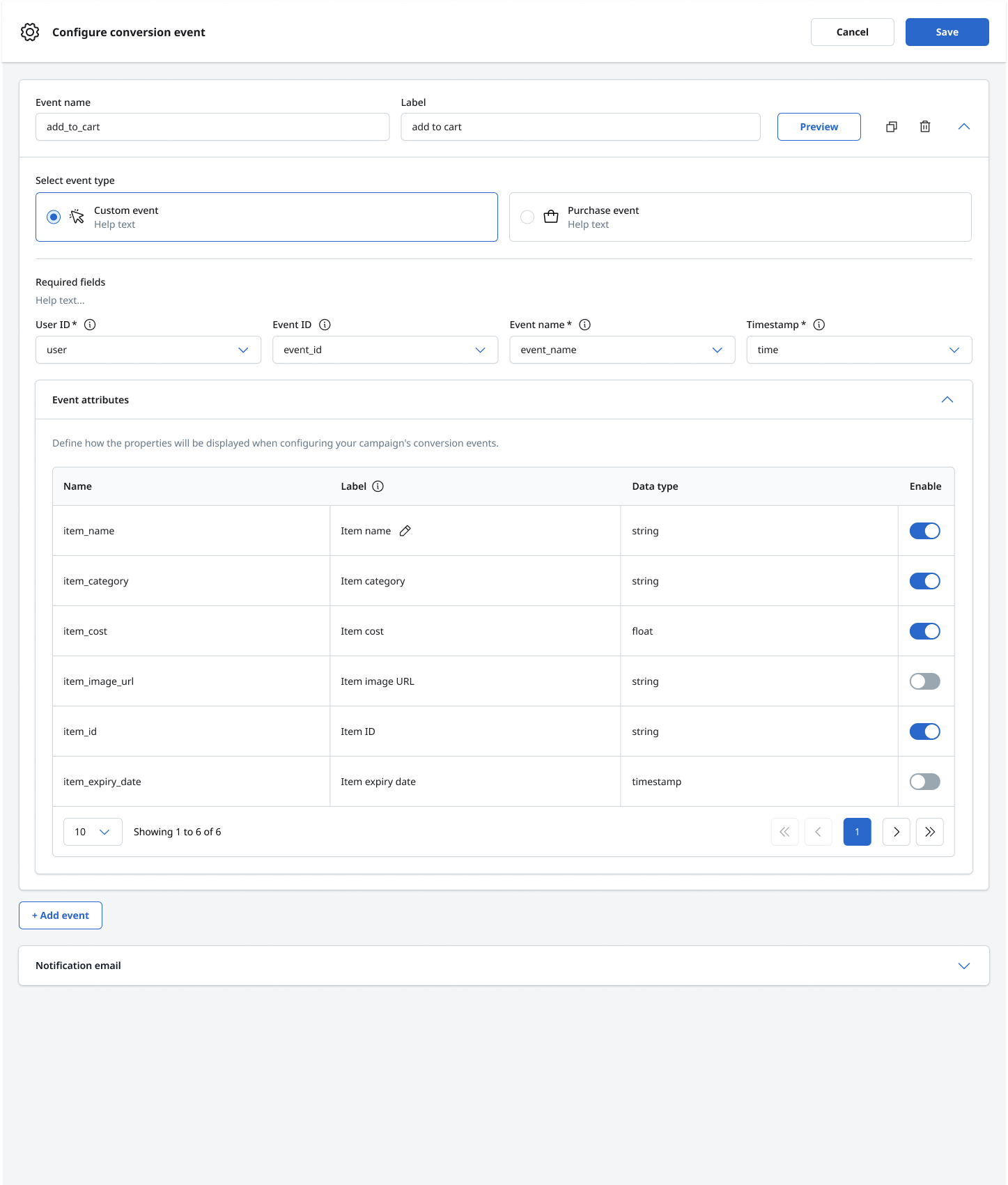
ConfigureConversion event configuration interface showing custom event fields and event attributes
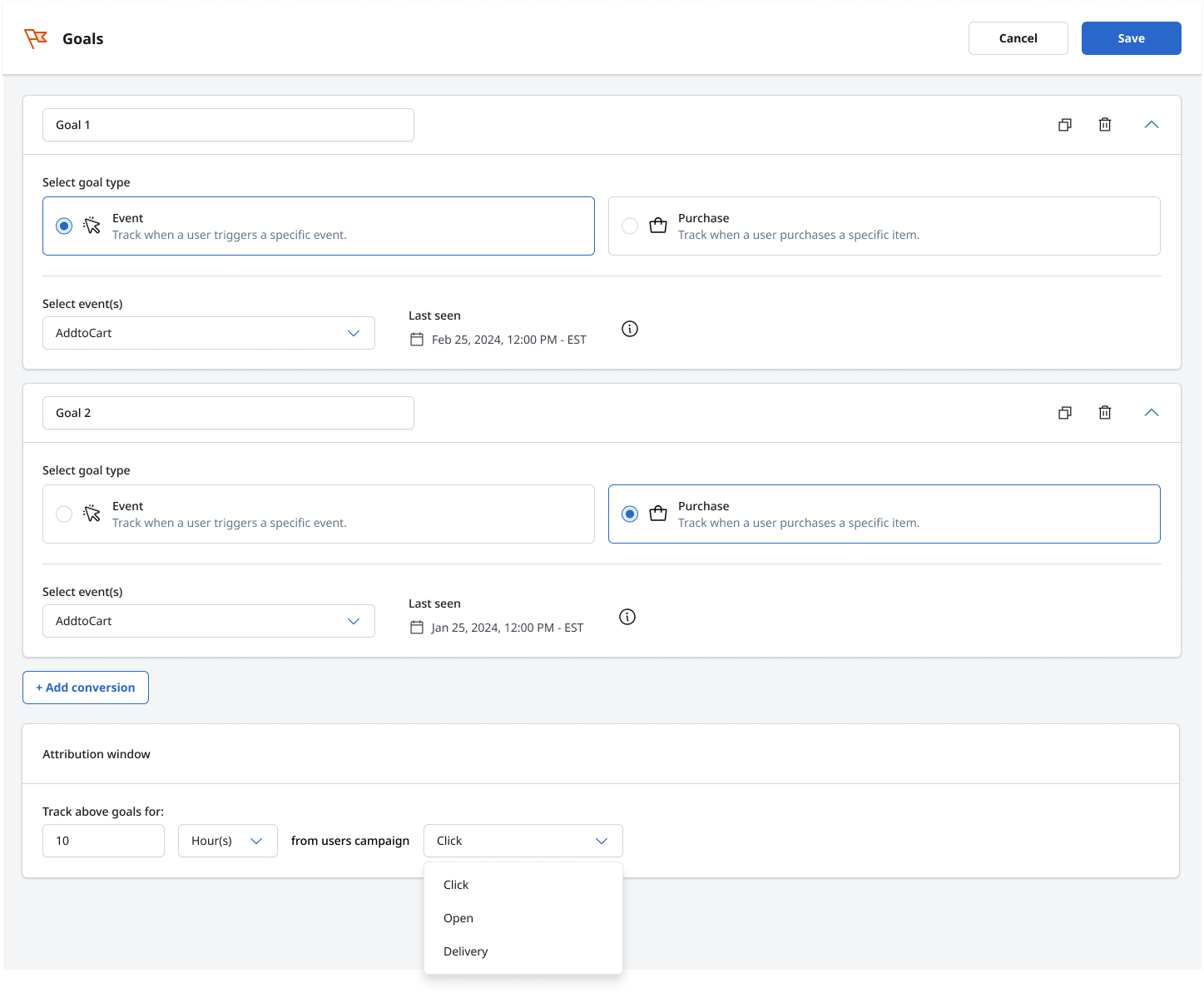
MeasureCampaign goals builder connecting event and purchase goals to an attribution window
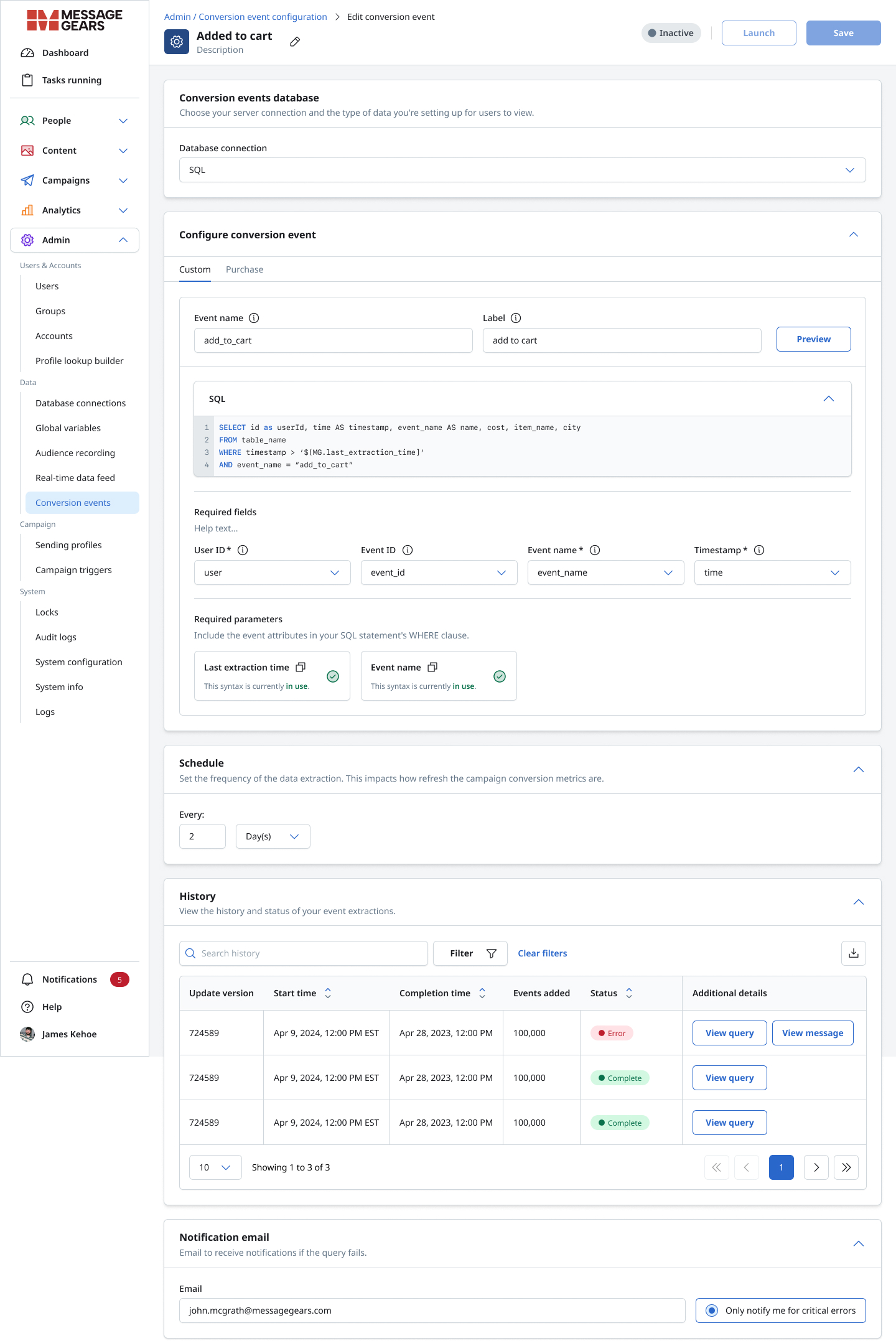
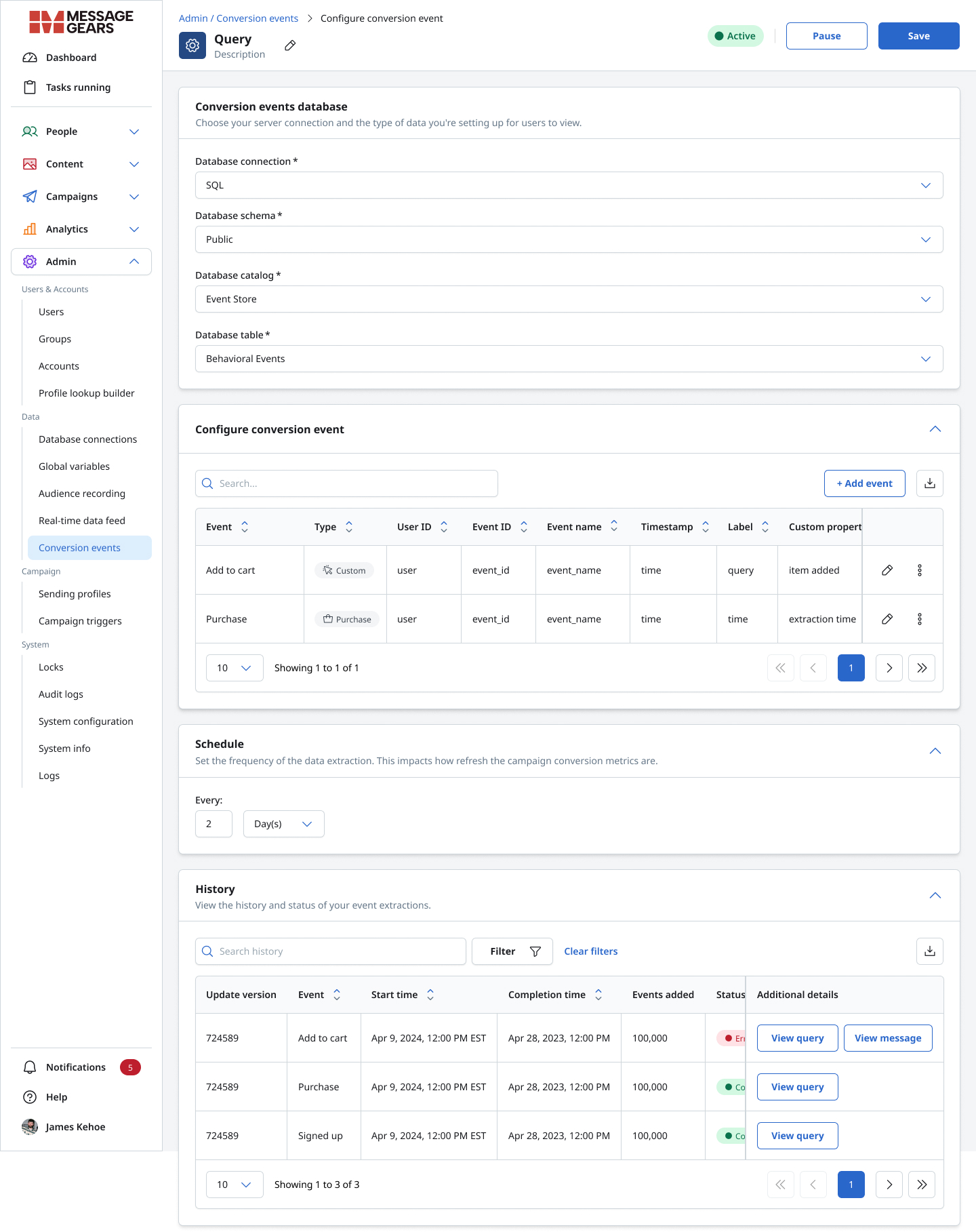
MonitorTechnical conversion-event configuration with SQL, schedules, and extraction history

The Challenge

Users were optimizing campaigns without a clear way to define what conversion actually meant.

Customers could send sophisticated campaigns, but the platform did not provide a comprehensive way to define the behaviors that represented success.

A conversion might be:

  • adding a product to a cart
  • completing a purchase
  • signing up
  • viewing content
  • clicking a key action
  • triggering another meaningful behavioral event

Without a structured conversion system, marketers had limited visibility into what happened after campaign engagement.

At the same time, technical users needed control over event data, schemas, field mappings, schedules, and SQL-based configuration.

A major prospective customer also required stronger conversion tracking capabilities, turning the gap into both a user problem and a business risk.

System Thinking

Adding conversion tracking changed more than the conversion screen.

Introducing behavioral conversion data affected campaign configuration, events, goals, attribution, reporting, analytics, terminology, schedules, extraction, history, errors, and notifications.

Event DataConversion EventsCampaign GoalsReporting + Analytics
ValidationHistorySchedulesNotifications

Adding one capability changed the meaning of several existing parts of the platform.

Research

Understanding how the market handled events, goals, and analytics.

I reviewed how competing marketing and customer-engagement platforms approached conversion tracking, behavioral analytics, dashboards, reporting, and event configuration.

The research included Braze, CleverTap, Airship, OneSignal, Customer.io, Iterable, Hightouch, MoEngage, WebEngage, and other analytics and messaging platforms. The goal was to understand definitions, data volume, goal configuration, technical depth, reporting language, and the path from setup to analysis, not to copy an existing pattern.

Research landscape comparing conversion tracking, reporting, and analytics patterns across enterprise marketing platforms
Competitive landscape review across event configuration, campaign measurement, and analytics.

What the research revealed

  1. Conversion tracking was increasingly expected in enterprise marketing platforms.
  2. Many experiences exposed substantial power but also substantial complexity.
  3. Metric naming and reporting structures were often inconsistent across channels.
  4. Marketers benefited from guided configuration, while technical users still needed deeper control.
  5. Validation and visibility into data health were critical to trusting conversion metrics.

The Core Product Question

How might we make conversion tracking simple enough for marketers and powerful enough for technical users?

The solution could not force every user into the same level of complexity. It needed to reveal technical depth only when the user's task required it.

Progressive ComplexitySimple where possible.
Powerful where necessary.

User Needs

The same conversion data supported very different workflows.

01

Marketing User

  • Configure meaningful events without SQL
  • Connect events to campaign goals
  • Understand what is being measured
  • Set attribution behavior
  • Preview data before relying on it
  • Know when an event was last detected
  • Reduce dependency on engineering
02

Data Admin / Technical User

  • Choose database sources
  • Work across schema, catalog, and table structures
  • Map required event fields
  • Write and validate SQL
  • Define custom parameters
  • Control extraction schedules
  • Inspect history and failures
  • Understand exactly what the system is processing

One system. Two levels of technical depth.

Product Strategy

Separate the setup experience. Share the underlying model.

Marketer-Friendly Path

Structured event configuration

  • Custom event
  • Purchase event
  • Required fields
  • Attributes
  • Goal selection
  • Attribution
Shared LayerConversion Event Model
Campaign GoalsPreview + ValidationHistoryReporting

Technical Path

Direct data control

  • Database connection
  • Schema
  • Catalog
  • Table
  • SQL
  • Field mapping
  • Parameters
  • Schedule

Rather than creating two disconnected products, both experiences were designed around the same event structure. This allowed the interface to adapt to the user's level of technical control while keeping event definitions consistent across the platform.

Core Experience

Make the first step clear before introducing complexity.

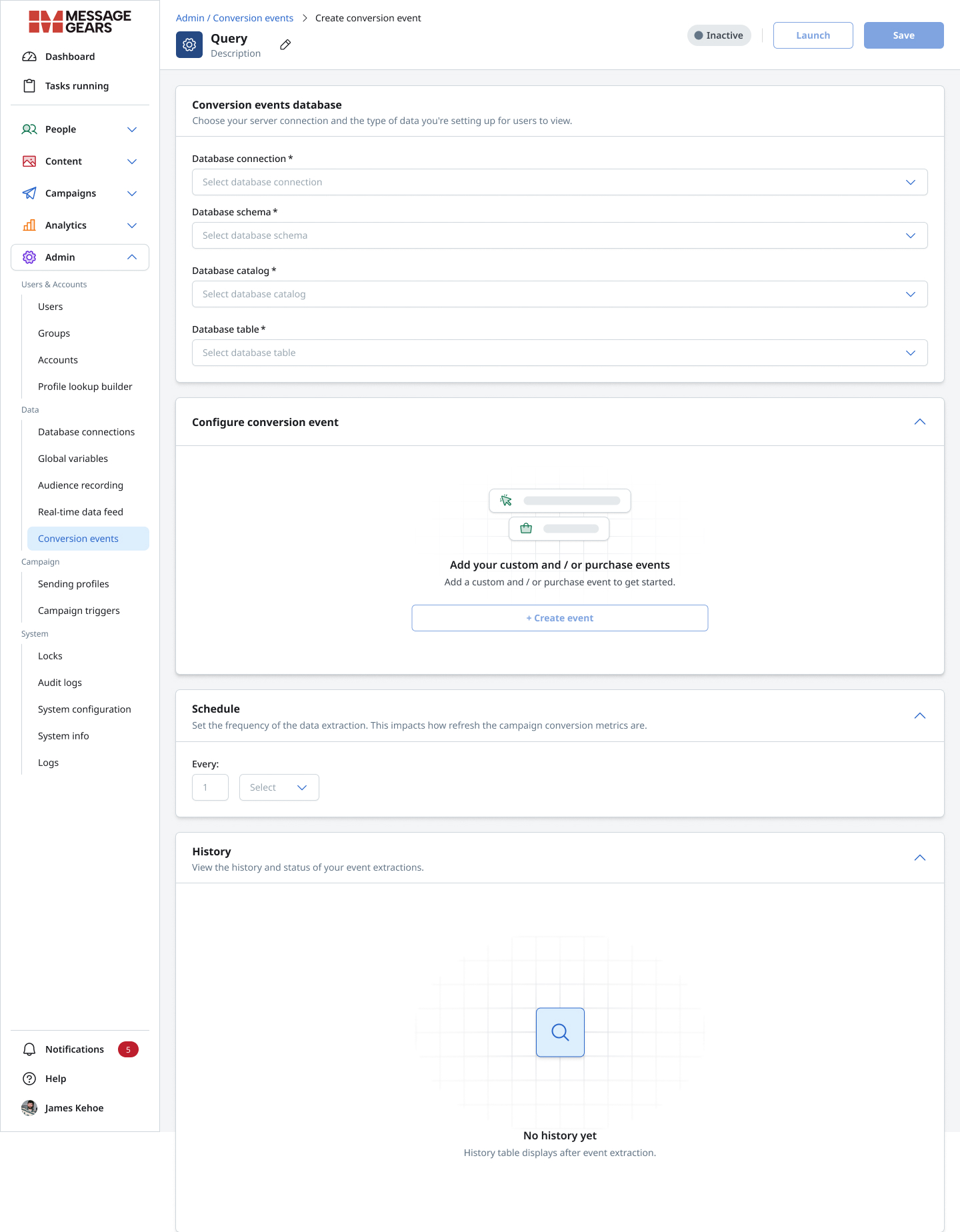
The create state establishes the structure of the system before asking users to configure individual events.

Users first choose the data source and then add either custom events, purchase events, or both. The empty state communicates the two supported event types without immediately exposing every configuration option.

Initial conversion event setup with database fields and an empty state for custom and purchase events
The initial state establishes the event model before exposing deeper configuration.

Event Configuration

Turn complex event data into a structured setup flow.

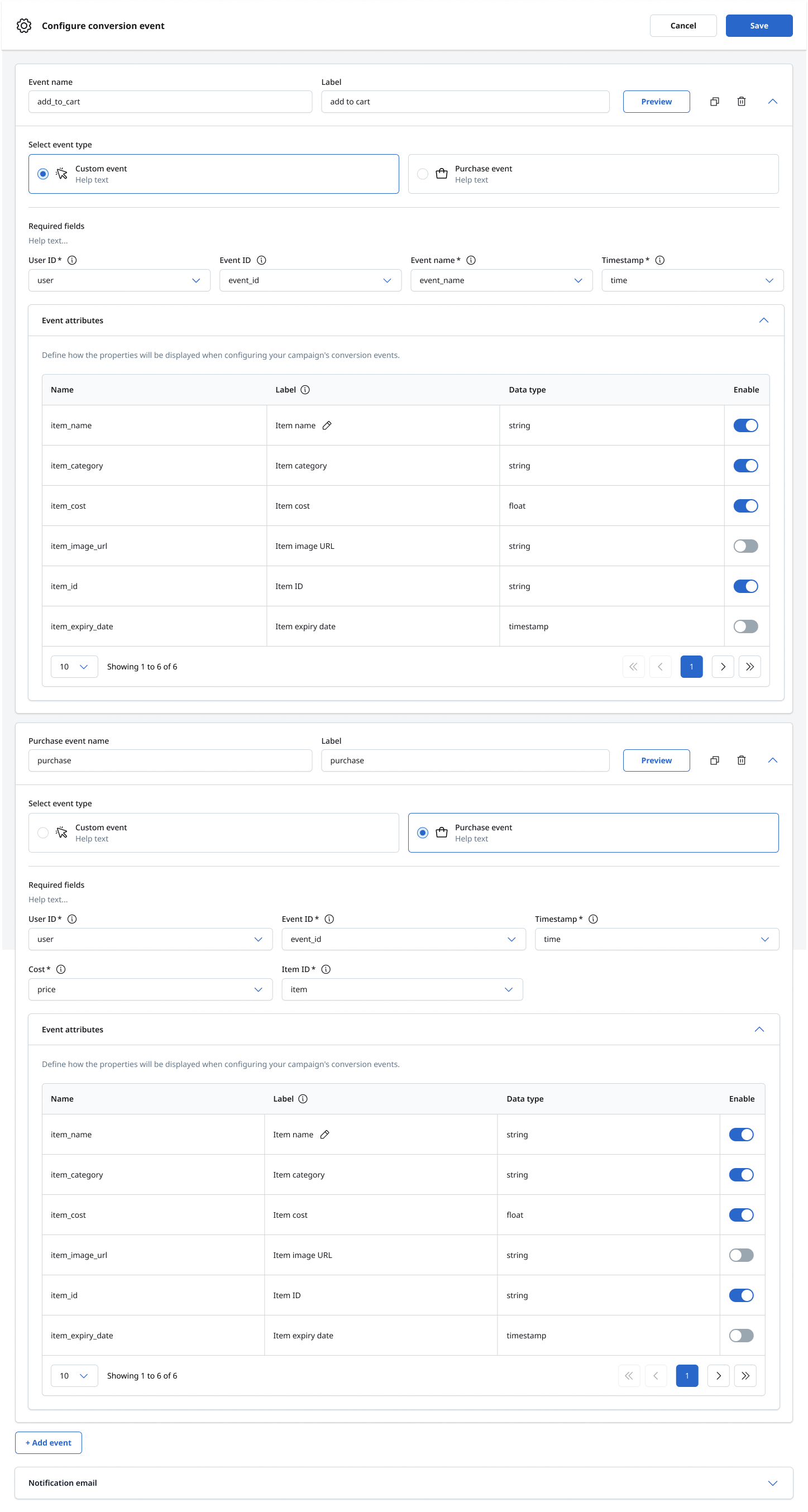
The configuration experience organizes event setup into clear sections so users can understand what the system needs and why. For custom events, users define the event name, label, type, IDs, timestamp, attributes, and notification behavior without needing to understand the underlying data architecture.

Custom conversion event configuration showing required fields and optional event attributes
Design Decision

Required information is grouped first. Optional attributes remain available without dominating the primary task.

Combined custom and purchase conversion-event configuration within one workflow

Flexibility

Custom behavior and purchase behavior needed to live in the same system.

A custom event might represent an add to cart, content view, signup, button click, or account action. A purchase event adds commerce-specific requirements such as purchase identification, cost, item ID, and product attributes.

Both conversion types use the same interaction model, keeping the system learnable while allowing each type to expose the fields it needs.

Goal Tracking

An event only becomes valuable when the product connects it to an outcome.

Marketers needed to tell the platform which behaviors represented campaign success. The Goals experience lets users name a goal, choose Event or Purchase, select an event, confirm when it was last seen, add multiple conversions, and define the attribution window and qualifying campaign interaction.

Campaign goals builder with event and purchase goals plus attribution controls

Event → Goal → Attribution → Campaign Performance

Attribution

Define when a conversion should count.

A conversion occurring after a campaign interaction does not automatically mean the campaign caused it.

The controls let marketers define a duration, time unit, and qualifying interaction such as Click, Open, or Delivery.

The goal was to provide enough control for meaningful attribution without turning campaign setup into a technical analytics exercise.

Preview + Validation

Configuration is not complete until users can verify the data.

Conversion tracking depends on the quality of the event data feeding the system.

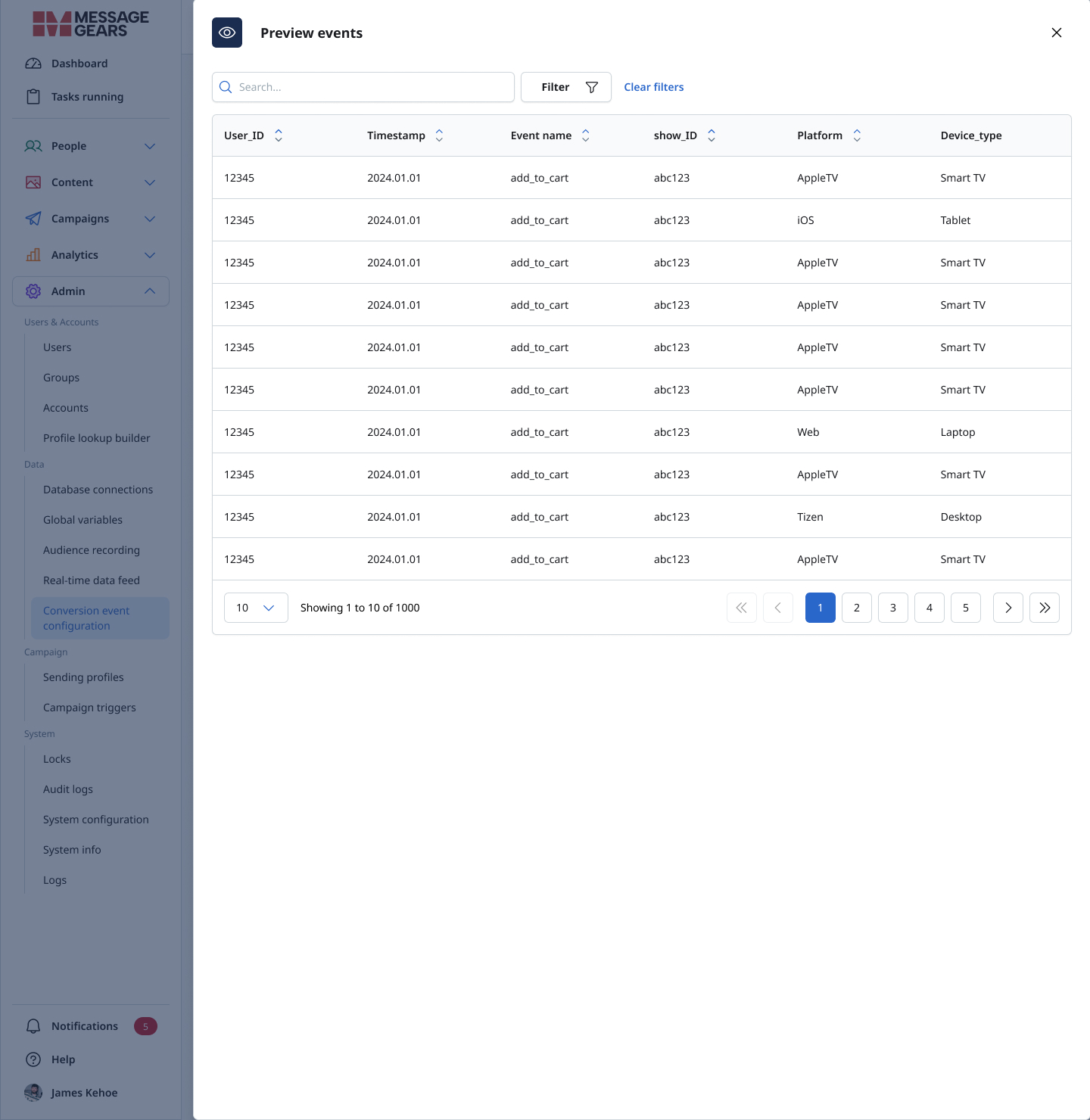
The Preview experience provides a tabular view of records including user ID, timestamp, event name, platform, device information, and custom properties.

Product Principle

Preview reduces uncertainty before an event becomes part of campaign measurement.

Preview table showing conversion-event records across users, timestamps, platforms, and devices
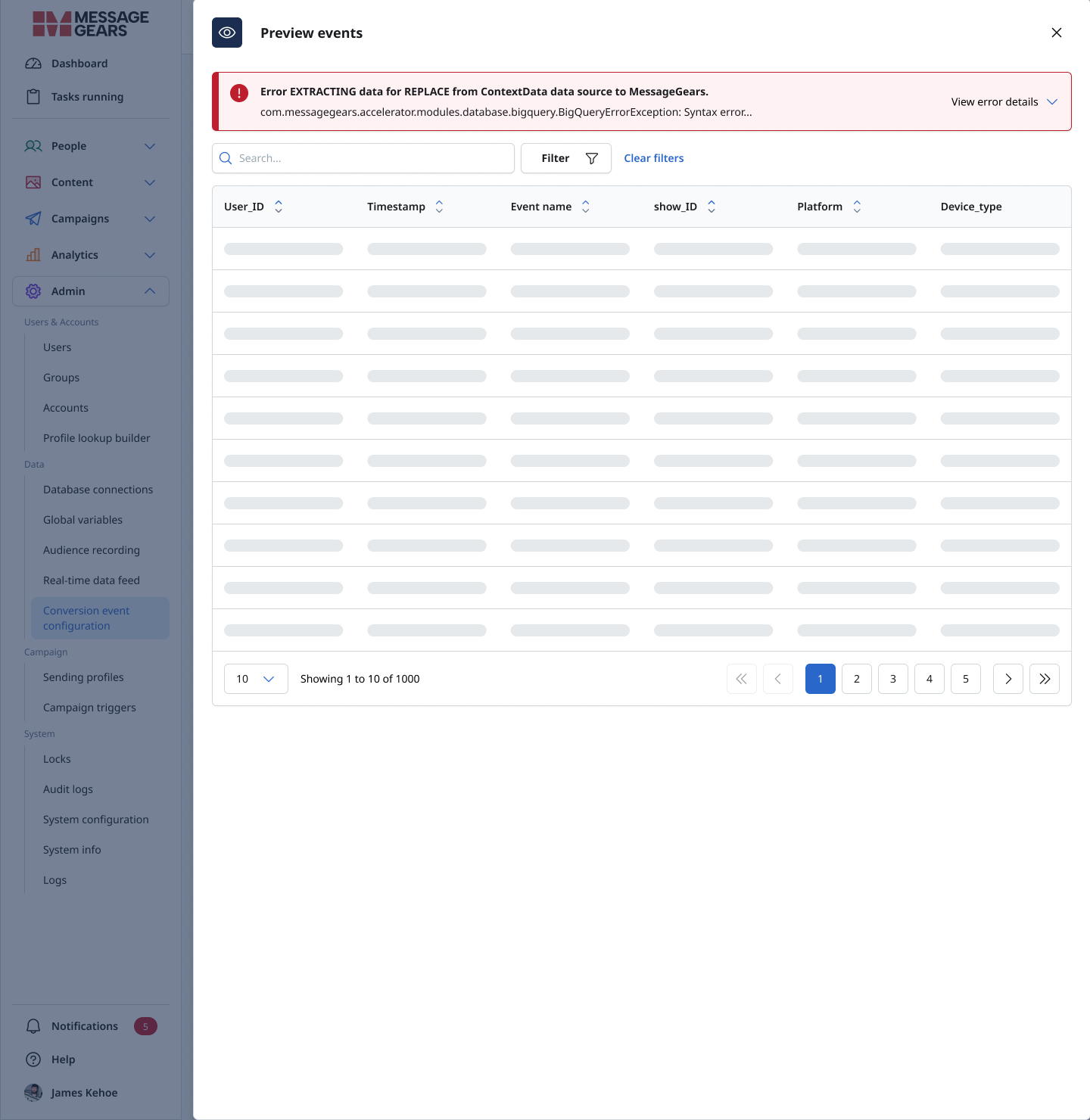
Conversion-event preview showing an extraction error with technical context

Failure States

For a data product, error handling is part of the core experience.

Event extraction can fail because of invalid queries, unavailable data, schema changes, connection problems, or unexpected values. Those failures cannot remain hidden.

The preview surfaces extraction errors and preserves technical details for troubleshooting without forcing every user into raw debugging.

Surface the problem.
Preserve the context.
Provide a path forward.

Technical Experience

Powerful configuration without forcing that complexity on everyone.

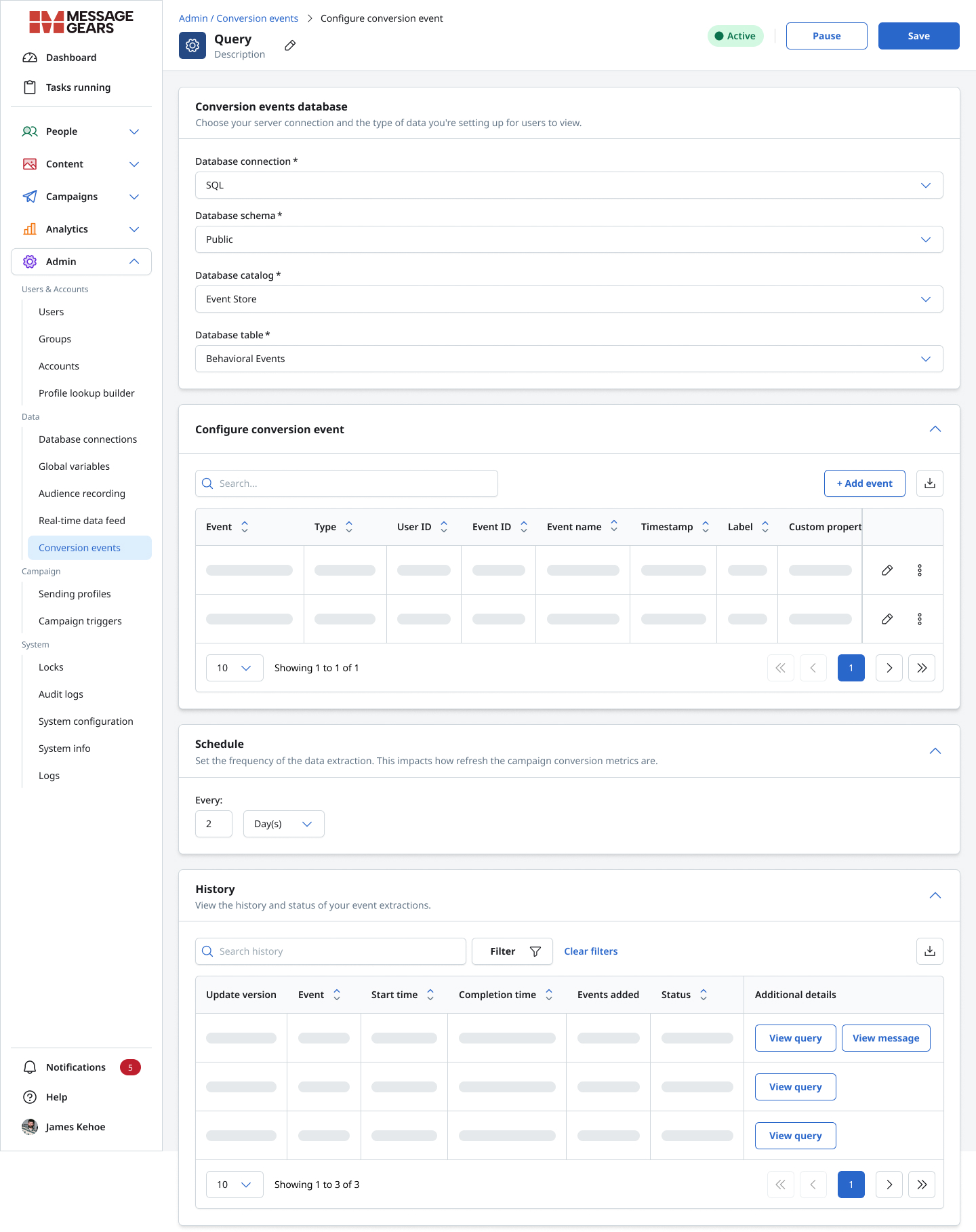
Technical users required control over database connections, schema, catalog, table, SQL definitions, field mappings, parameters, preview, schedules, history, status, and notifications. The deeper workflow remained consistent with the marketer-facing event model.

Technical conversion-event workflow with SQL query, field mapping, schedule, history, status, and notifications

Operational Trust

Setup was only part of the job.

A conversion event can work today and fail later. History gives users visibility into update version, start and completion time, events added, status, query details, and failure messages.

Schedule controls determine refresh frequency. Notification settings alert users when extraction issues occur.

Together, these features move the experience beyond configuration and toward ongoing operational confidence.

System States

A reliable product has to work before, during, and after the data arrives.

Enterprise workflows rarely exist only in their ideal populated state. The design accounted for the full lifecycle so users always understood what the system was doing.

EmptyEmpty conversion-event setup before events have been added
LoadingConversion events and history tables displaying loading states
Populated / ActiveActive conversion-event configuration with populated event and history tables
ErrorConversion event preview displaying a data extraction error

Decisions

The interface was only one part of the solution.

01

Clarity Before Technical Depth

Give marketers a structured configuration path before exposing database-level complexity.

02

One Event Model

Keep custom events, purchase events, goals, and technical configuration aligned around the same concepts.

03

Validate Before Measure

Allow users to preview incoming data before using it to evaluate campaign performance.

04

Design for Operations

Schedules, history, status, errors, and notifications are part of the product, not secondary admin details.

Platform Impact

New behavioral data changed how the rest of the product talked about performance.

Conversion Events introduced behavioral concepts that needed to remain consistent across metric terminology, engagement definitions, cross-channel reporting, campaign and job analytics, conversion reporting, goals, and information hierarchy.

This required decisions beyond the new screens themselves and reinforced a broader principle:

New features have to fit the language and mental model of the entire platform.

Cross-Functional Work

Designing the workflow required close alignment between product behavior and data behavior.

I partnered with Product Management, Engineering, and other stakeholders to align user needs, business requirements, data structures, technical feasibility, existing patterns, metric definitions, validation behavior, and implementation details.

Design critique was especially important because seemingly small terminology or interaction changes could affect multiple parts of the analytics experience.

Outcome

A foundation for event-driven campaign measurement.

The work delivered a zero-to-one conversion tracking system connecting event definition, campaign goals, validation, technical configuration, and ongoing monitoring.

  • Enabled marketers to configure conversion goals with less technical dependency.
  • Preserved deeper SQL and data controls for technical users.
  • Created clearer connections between behavioral events and campaign performance.
  • Introduced validation and monitoring patterns that increased transparency around event data.
  • Addressed an important enterprise product capability required in competitive sales opportunities.
  • Created a scalable foundation for future behavioral analytics and reporting.

Reflection

The hardest part was not the configuration UI.

The real design challenge was creating a system that could be simple and advanced at the same time without feeling like two disconnected products.

This project reinforced that enterprise product design is not only about reducing fields or making a screen easier to scan. It is about understanding where complexity is necessary, deciding who needs to see it, and giving users enough visibility to trust what the system is doing.

Simplicity should be the default.
Control should still be available.

Have a Complex Product Problem?

Bring us the messy version.

Whether you are shaping a new SaaS product, improving an existing workflow, or figuring out what needs to be built next, All Hatched can help turn complexity into a clearer product direction.